- Analytic AI for SAP Business One
Make Decisions Instantly⏱️
Just ask 💬 get analytic insights
– No Analyst, Dashboard.
– No Manual reports.
– No Decision delays
– Just clear insights & actionable
Cloud ready



- The problem and solution
Stop decision delays, Break analyst limitations.
10X Faster Reviews, 10X Smarter Decisions 🤖
Data silos → Cross-module visibility
Finance, sales, inventory, operations—together.
Excel chaos → Single source of truth
Live ERP data, no copies or versions.
Manual reports → Instant answers
Ask questions instead of building reports.
Analyst dependency → Self-service intelligence Leaders don’t wait for data teams.
Complex dashboards → Plain-language insights Numbers explained, not just shown.
Static reports → Proactive alerts
AI flags risks, anomalies, and opportunities.
Human Reviews → Automated reviews
on time and accurate reporting and actions.
Late decisions → Faster execution
Insights arrive at time.
Role confusion → Role-based answers
CFO, Sales Head, Ops Manager see what matters.
Error-prone reporting → Trusted automation
Fewer human mistakes, higher confidence.
- Analytic AI for SAP Business One
AI 🤖 enable analytics and performance reviews.
AI turns data into clarity, insights, and action.
How it works ?

For who ? 💁♂️💁♀️
Sales Heads & Commercial Leaders
Track sales performance, customer trends, pricing impact, and revenue opportunities in seconds.
Operations & Supply Chain Heads
Monitor inventory movement, stock risks, purchasing efficiency, and operational performance in real time.
CFOs & Finance Leaders
Instantly analyze margins, cash flow trends, receivables, and cost deviations to make faster financial decisions.
Department Managers
Ask questions directly from ERP data and get insights instantly—without relying on analysts or complex reports.
Business Owners & Managing Directors
Get a clear, real-time view of overall business performance—sales, profitability, cash flow, and operational risks—without waiting for reports.
ERP Leaders & IT Teams
Enable leadership teams with secure, AI-driven analytics without building or maintaining complex dashboards.
InsightsFlow AI Chat 💬
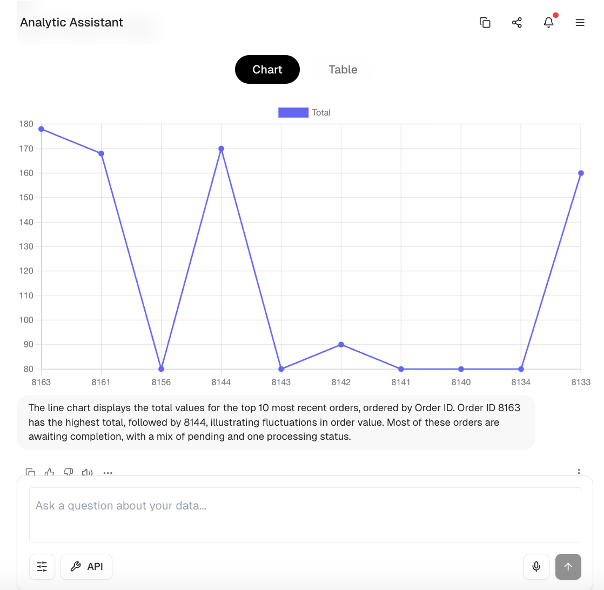
Ask insights, analytics, or trends in plain english and get insstant clarity
Like “What’s our gross margin trend this quarter?”—and instantly get clear insights: concise narratives, visual charts, and progress stories from your ERP. No dashboards. No noise. Just role-specific understanding for leaders and decsion makers , powered by ai analytic assistant. instant clarity
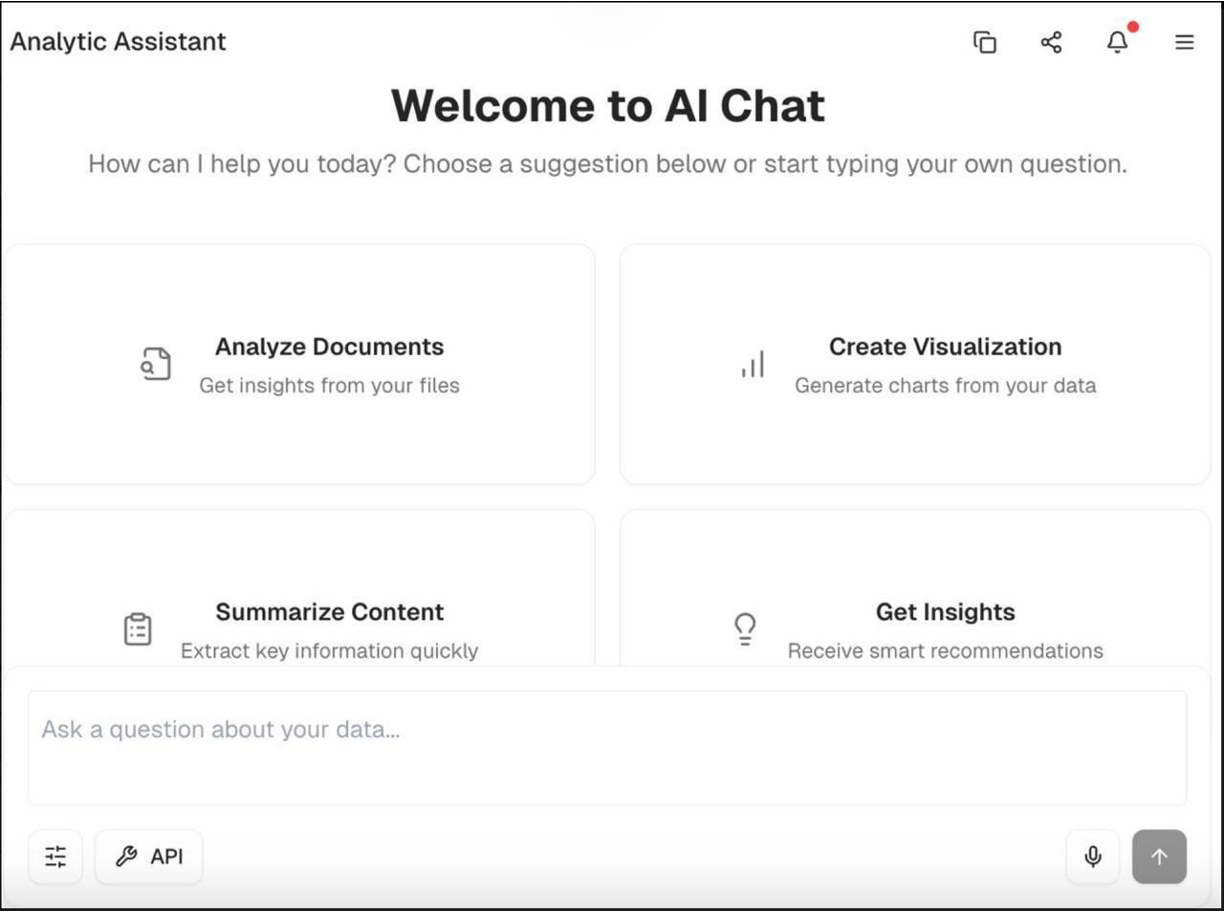
AI-generated trend analysis
Automatically detect patterns, changes, and performance trends—explained in clear, plain language.
Instant answers across your entire business
Ask a question and instantly understand what’s happening in sales, inventory, purchasing, or finance.
Self-service insights for leadership teams
Managers and executives can explore data directly, without relying on analysts or manual reporting.
Real-time operational visibility
Monitor business performance continuously without navigating complex ERP reports
Standardised 200 + KPI’s intelligence
AI frames performance using best-practice metrics and consistent business signals.
Faster, smarter leadership meetings
Share clear insight snapshots so teams spend less time reviewing data and more time making decisions
PerformFlow AI Chat 💬
Ask Insights, Plan, Analyze, Advise, Action items to followup and optimize.
PerformFlow Features + AI-powered planning, root-cause analysis, prescriptive advice, and executable action plans. Your AI performance co-pilot for proactive leadership and closed-loop execution.
Turn Insights Into Action : Move from “What happened?” to “What should we do next?”
AI not only explains performance—it recommends the next best actions to improve results.
Real-time operational visibility
Monitor business performance continuously without navigating complex ERP reports
Role-based decision guidance
Recommendations are tailored to each leader’s role—whether CFO, operations head, sales director, or inventory manager.
Automatic plan vs. performance analysis
AI continuously compares targets with actual results and highlights gaps, risks, and opportunities with suggested corrective steps.
Built-in performance management rhythm
Daily, weekly, and monthly performance insights are delivered automatically—no need to prepare reports or schedule extra review meetings.
Clear ownership and action tracking
When deviations or opportunities appear, AI identifies the issue and suggests specific actions for responsible teams.
Faster course correction
Detect problems early and act quickly—before small operational issues turn into lost revenue or margin erosion.
⤴️ Get Started—We’ll Handle the Rest
Connect Your ERP Data 𐄘
Securely connect to your SAP Business One environment. Our team handles the setup so your data is ready for AI-powered insights.
Ask Analytic questions and get answers 💬📈
Ask analytics questions in plain English and instantly receive clear answers, trends, and KPI insights from your live ERP data
,Plan, Analyse Act 🎯
Set performance targets and smart alerts. The AI continuously monitors your business and notifies you when action is needed.
Why us?
100+ years ERP experience → Built for real-world business challenges
Deep domain expertise → Practical insights without external dependency
Advanced analytics knowledge → Simplifies data into clear decisions
Private AI deployment → Full control, security, and enterprise trust
Fast onboarding → Quick setup with guided adoption and coaching
ERP-native add-on → No disruption, immediate value from existing systems
Frequently asked questions ⁉️
1. Is our ERP data secure? Yes. Morrai runs in a secure private deployment connected to your SAP Business One environment. Your data remains fully under your control and is never used to train public AI models.
Yes. Morrai runs in a secure private deployment connected to your SAP Business One environment. Your data remains fully under your control and is never used to train public AI models.
2. Can insights be restricted by role? Yes. Morrai provides role-based AI insights. For example: • CFO sees financial performance and margin trends • Sales heads see customer and revenue insights • Operations leaders see inventory and purchasing insights Every user only sees the data relevant to their role and permissions.
Yes. Morrai provides role-based AI insights. For example: • CFO sees financial performance and margin trends • Sales heads see customer and revenue insights • Operations leaders see inventory and purchasing insights Every user only sees the data relevant to their role and permissions.
3. Is this ready to use or do we need to build dashboards? Morrai comes with 200+ ready-to-use KPIs and analytics models designed for SAP Business One. You don’t need to design dashboards or reports. Simply ask questions and get instant insights.
Morrai comes with 200+ ready-to-use KPIs and analytics models designed for SAP Business One. You don’t need to design dashboards or reports. Simply ask questions and get instant insights.
4. Can it support our custom business processes? Yes. Morrai adapts to your specific workflows, KPIs, and industry requirements. Many SAP Business One environments include customizations and add-ons, and the AI assistant can incorporate those into analytics.
Yes. Morrai adapts to your specific workflows, KPIs, and industry requirements. Many SAP Business One environments include customizations and add-ons, and the AI assistant can incorporate those into analytics.
5. How long does implementation take? Typical onboarding takes 2–4 weeks depending on data size and ERP configuration. However, many companies start seeing insights within days after connection.
Typical onboarding takes 2–4 weeks depending on data size and ERP configuration. However, many companies start seeing insights within days after connection.
6.How does onboarding work? Our onboarding process is simple: Connect to your SAP Business One database Activate AI analytics and KPIs Train leadership teams with guided AI usage Your team can start asking questions and receiving insights immediately after setup.
Our onboarding process is simple: Connect to your SAP Business One database Activate AI analytics and KPIs Train leadership teams with guided AI usage Your team can start asking questions and receiving insights immediately after setup.
7. Do you provide ongoing support? Yes. Morrai includes continuous support and optimization. Our team helps: • refine KPIs • improve AI insights • support leadership teams This ensures your AI analytics continues delivering value as your business grows.
Yes. Morrai includes continuous support and optimization. Our team helps: • refine KPIs • improve AI insights • support leadership teams This ensures your AI analytics continues delivering value as your business grows.
9. How are upgrades handled? Morrai continuously improves AI capabilities. Updates include: • new KPIs • improved analytics models • enhanced insights and recommendations Upgrades are delivered seamlessly without disrupting your SAP Business One environment.
Morrai continuously improves AI capabilities. Updates include: • new KPIs • improved analytics models • enhanced insights and recommendations Upgrades are delivered seamlessly without disrupting your SAP Business One environment.
10. How does Morrai connect with SAP Business One? Morrai integrates securely with SAP Business One using ERP connectors and APIs. This allows the AI assistant to analyze data across: • Sales • Inventory • Purchasing • Finance • Customers and suppliers No ERP migration is required.
Morrai integrates securely with SAP Business One using ERP connectors and APIs. This allows the AI assistant to analyze data across: • Sales • Inventory • Purchasing • Finance • Customers and suppliers No ERP migration is required.

Join Free Weekly ERP AI Coaching — Learn. Ask. Adapt AI
– Ask your own ERP questions live
– See real AI-driven insights in action
– Learn best-practice KPIs and decision frameworks
– Get expert guidance on your specific business use case
– No cost. No commitment. Just value